|
|
|
|
|


btn Element
The btn element is used to place a button on the toolbar. The contents of the element determine the image that will appear on the button and what it does. The contents of a btn element can be:
- Any single Unicode character supported by MathFlow, e.g., A, b, 3, etc.
- Any single MathML character name supported by MathFlow, e.g., alpha, otimes, infin, etc.
- A quote delimited run of Unicode characters supported by MathFlow, e.g. "sin", "Airy", etc.
- Any predefined template name.
- Any predefined icon name.
- A valid MathML string.
Consult the tables of Predefined Templates, Palettes, Palette Labels, and MathFlow Characters for a complete listing.
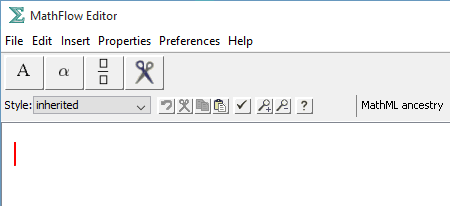
When a character or character name is given as the content of the btn element, a button is created displaying that character. When clicked, the button inserts the same character at the current cursor location.
When a pre-defined template name is given, a button is created displaying a graphic representation of the template, and clicking inserts the corresponding template at the current cursor location.
When an icon name is given, a button is placed on the toolbar displaying the named image. In the case of toolbox icons, the button is associated with the corresponding editor action, i.e., cut, paste, etc. However, when a non-toolbox icon name is given, i.e., "TRIGPALETTE," a button without any default action is created. Normally, one only uses these icons when creating a button to open a pull-down palette using the sub element (see below).
If a button name is not recognized, the toolbar parser will indicate the problem by creating a button displaying a red "X".
When MathML is given, an image of the corresponding typeset mathematical expression is generated and placed on the button. Unless the optional insertas element is used, the same MathML is inserted into the editor.
When the imagesrc attribute is present, the image indicated will be used for the button face, regardless of the element's content. The action for the button is identical to what it would be without the attribute. The image will be scaled and centered on the button.
Attributes
name |
permitted values |
type |
[mi | mn | mo] |
cue |
text string |
imagesrc |
a path relative to the |
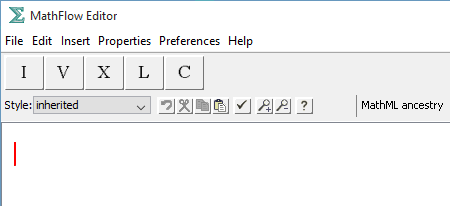
When creating a button to insert a character, there is an issue of what MathML code to generate. Some characters can be used as identifiers, numbers or operators, and thus should be tagged with the MI, MN, and MO MathML elements respectively. MathFlow tries to guess according to the following rules: If the character is in the MathFlow operator dictionary, it tags it as an MO. If it is a digit, it tags it as an MN. Otherwise, characters are treated as MI. By specifying a type attribute on a btn element, you can override this default behavior, and specify which element you would like to have generated.
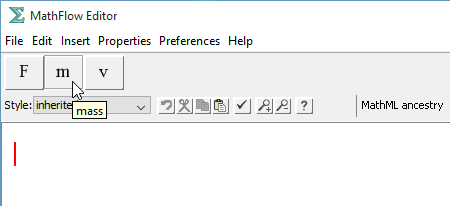
Similarly, MathFlow displays a default status line message when a reader mouses over a button on the toolbar. For characters, this default message is just the character name. For other icons and templates, the default message varies. By giving a cue attribute, you can specify your own status line message to be displayed on mousing over the button.
Children
name |
contents |
insertas (optional) |
MathML string |
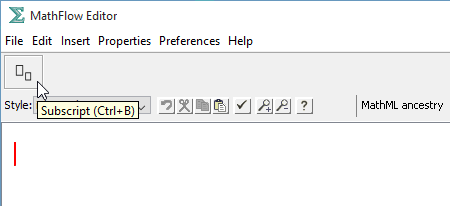
When using a MathML string for a button, you can differentiate the MathML used to display an image on the button from the MathML that is inserted into the editor. This allows you to "tweak" the MathML to appear correctly depending on where it is displayed. The content of the btn element indicates the MathML to be displayed on the button. The optional child element insertas indicates the MathML to be inserted into the editor.
Examples
<tb><btn>A</btn><btn>alpha</btn><btn>FRAC</btn><btn>CUT</btn></tb>
<tb><btn type='mn'>I</btn><btn type='mn'>V</btn> <btn type='mn'>X</btn><btn type='mn'>L</btn><btn type='mn'>C</btn></tb>
<tb><btn cue='force'>F</btn><btn cue='mass'>m</btn> <btn cue='velocity'>v</btn></tb>
<tb><btn cue='Subscript (Ctrl+B)'> <math><msub><mi>&template;</mi><mi>&template;</mi></msub></math><insertas> <math><msub><template/><template/></msub></math></insertas></btn></tb>
|
|
|
|
|
![[Design Science Home]](dessci_logo.gif)
Copyright © 1996-2016 Design Science, Inc. All rights reserved.