|
|
|
|
|


Sample Java Application
The sample Java program below illustrates how to use the DocumentComposer class to process a document with MathML. The source code is provided so that you can experiment with different techniques for use in your own programs.
Prerequisites for Running the Program
- Java 1.6 or higher
- The
dessci.licfile should be in the same directory as the sample code batch files or shell scripts. - This required .jar file needs to be on the
classpath:MathFlow.jar(all MathFlow SDK classes)
Running the Program
<path-to-mathflow-sdk>/java/samples/document_composer_app.bat (Windows)<path-to-mathflow-sdk>/java/samples/document_composer_app.sh (non-Windows)
The sample program allows you to change the input parameters used to process an input document with MathML (see below). After changing the input parameters and telling the program where to save the generated images, click the Generate Output Document button.
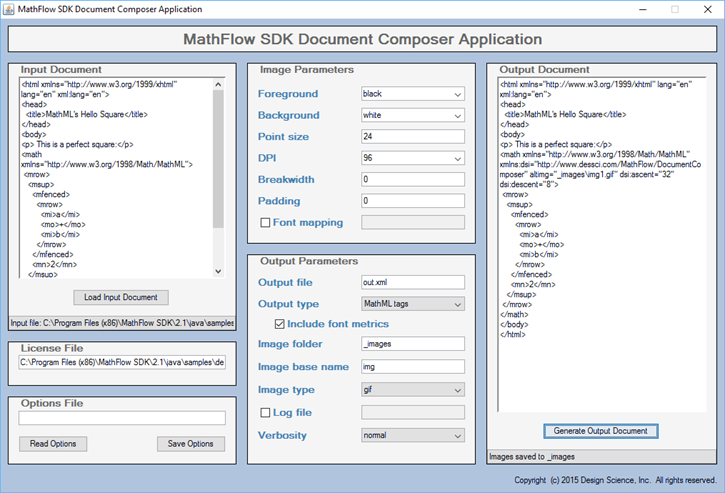
Source Code
The source code for the sample program is located in:
<path-to-mathflow-sdk>java/samples/com/yourcompany/samplecode/composer/DocumentComposerApplication.java
About the Script
The batch file (or shell script) calls DocumentComposerApplication.
java -classpath .;../MathFlow.jarcom/yourcompany/samplecode/composer/DocumentComposerApplication
Note that the source code for the sample program is located in the following directory:
<path-to-mathflow-sdk>java/samples/com/yourcompany/samplecode/composer/DocumentComposerApplication.java
Programming Notes
The main functions/subroutines in this program are as follows:
processDocument()
This function does the following within a Try/Catch block:
- Calls setOptions to set the options for the Document Composer using the values of the program controls
- Calls the method to process the input document
setOptions()
This function does the following:
- Sets the value of each option for the Document Composer from the corresponding program control
- The general strategy in the sample application for handling exceptions in the
SetOptionmethods is:- If an option is required (i.e.,
licenseorinputdoc) and an exception is thrown by theSetOptionmethod, throw an exception with the error message returned from theSetOptionmethod - If an option is optional and has a default value (e.g.,
pointsize), catch any exception thrown by theSetOptionmethod, retain the warning message for display later and continue processing, using the default value for that option - If an option is optional and does not have a default value (e.g.,
logfile), catch any exception thrown by theSetOptionmethod, retain the resulting message for display later and continue processing
- If an option is required (i.e.,
Note that this only one way in which the options for a Document Composer can be set. Another possible approach would be to call each set method when the value of a program control changes.
getOptions()
This function does the following:
- Sets the value of the program controls from the corresponding options of the Document Composer
readOptions()
This function does the following within a Try/Catch block:
- Calls the method to read the options from an XML file
- Calls getOptions to set the value of the program controls using the options for the Document Composer
saveOptions()
This function does the following within a Try/Catch block:
- Calls setOptions to set the options for the Document Composer using the values of the program controls
- Calls the method to save the options to an XML file
|
|
|
|
|
![[Design Science Home]](dessci_logo.gif)
Copyright © 1996-2016 Design Science, Inc. All rights reserved.